Close the Notebook Without run Office OneNote
Sometimes, due to OneNote synchronization, OneNote crashes and crashes as soon as you run it. There was no time to close the OneNote notebook.
The OneNote Batch offers a "Close Notebook" feature.
After OneNote Batch runs, it lists all notebooks in Office OneNote on the left side.
Right-click the notebook you want to close, then click the Close Notebook menu in the pop-up right-click menu. You can close this notebook.
This way, running OneNote won't crash.
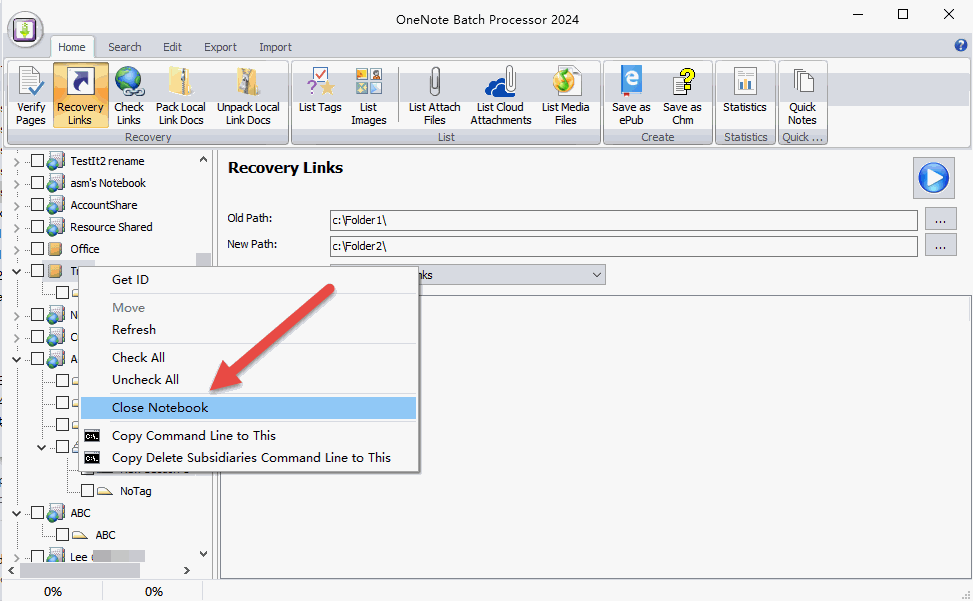
The OneNote Batch offers a "Close Notebook" feature.
Close Notebook
You can open OneNote Batch when OneNote is not running.After OneNote Batch runs, it lists all notebooks in Office OneNote on the left side.
Right-click the notebook you want to close, then click the Close Notebook menu in the pop-up right-click menu. You can close this notebook.
This way, running OneNote won't crash.