
How to Repair OneNote to Fix Errors?
2019-11-18 20:55
OneNote is very fragile due to OneNote involves numerous software,OneNote sometimes has got corrupted, and not working properly.
Follows are some common problems:
Many OneNote users meet these mistakes.
The most effective way is to repair the OneNote when these mistakes appear. How to repair OneNote is also the basic skills of using OneNote.
Below is how we repair the OneNote.
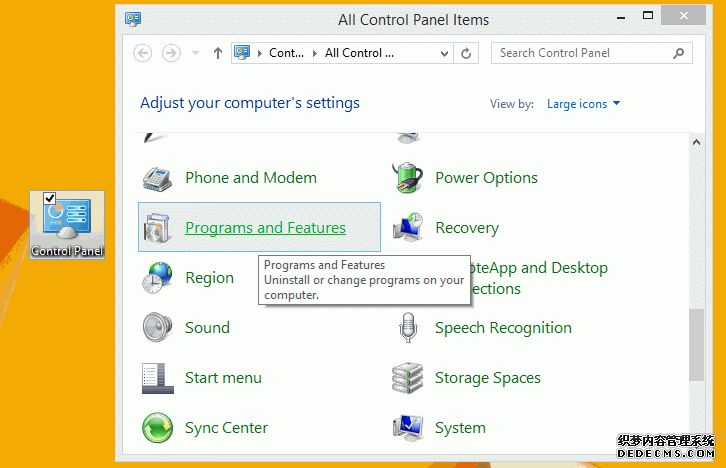
At first, Open Windows Control Panel -> Programs and Features.
(In Windows 10, Press Win+S key to open Windows search, input "Control", you will find the old Windows Control Panel).
Follows are some common problems:
- Send to OneNote disappear or is unavailable when update IE.
- Print to OneNote is not available after installed OneNote patch.
- Send to OneNote insanity when installing multiple OneNote versions.
- Installed multiple OneNote versions.
- Uninstall one of OneNote version after installed multiple OneNote versions.
Many OneNote users meet these mistakes.
The most effective way is to repair the OneNote when these mistakes appear. How to repair OneNote is also the basic skills of using OneNote.
Below is how we repair the OneNote.
At first, Open Windows Control Panel -> Programs and Features.
(In Windows 10, Press Win+S key to open Windows search, input "Control", you will find the old Windows Control Panel).
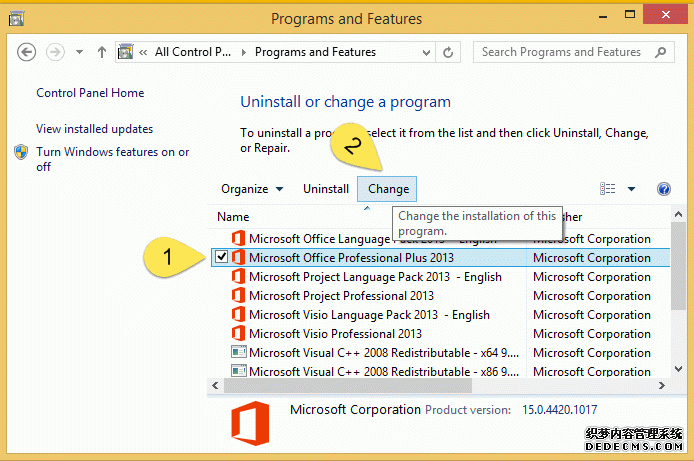
Next, In "Uninstall or change a program", find and select the "Microsoft Office Professional Plus 2013", and click the "Change".
or select "Microsoft 365" if Office is 365.
or select "Microsoft 365" if Office is 365.
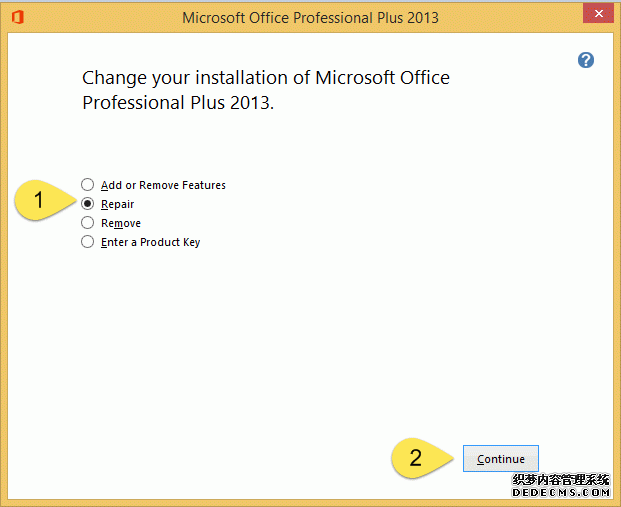
In popup "Change your installation of Microsoft Office Professional Plus 2013" dialog, choose the "Repair" and click "Continue", it will start to repair the Office include OneNote with its tools.
| EXE Addins | Cloud Addins | MAC Addins |
Related Documents
- OneNote: something went wrong during sync. We’ll try again later. (Error code: 0xE000002E)
- OneNote 365: we can't open this section because we found a problem with its contents.
- OneNote v2508 Modifies the Format Painter Keyboard Shortcut as Ctrl+Alt+C and Ctrl+Alt+V
- How to fix hit Ctrl key causes OneNote to zoom in or out of the page?
- Why stuck on Old OneNote 2016 in Office 2019 when Installed New OneNote from Microsoft Store?

