Search
OneNoteGem
  • Home
  • Addins
    • Windows Office Addins >
      • Gem for OneNote
      • OneNote Search Bar
      • OneNote Gem - Favorites
      • OneNote Batch
      • Pons for MindManager and OneNote
      • Mind Map for OneNote
      • Pons for Visio and OneNote
      • Row to OneNote
      • Auto OneNote
      • Favorite to OneNote
      • Bridge for EndNote and OneNote
      • Anchor to OneNote
      • Anchor to OneNote for PDF
      • Bring to OneNote
      • Gem Table for OneNote
    • Windows Cloud Addins >
      • CiteBoard for OneNote
      • OneReader
      • OneMind for Web OneNote
      • OneNote Reminder Cloud
      • OneNote Batch Cloud
    • Mac Addins >
      • Gem Menu for Mac OneNote
      • CiteBoard for OneNote
      • Bring to Mac OneNote
      • OneMind for Mac OneNote
      • OneNote Reminder for Mac
      • OneNote Batch for Mac
      • Fix One for Mac - Fix OneNote Login, Sync Tools
    • Android Addins >
      • CiteBoard for OneNote
      • Fix One for Android - Fix OneNote Login, Sync Tools
    • Cross-Platform Addins >
      • OneNote Reminder
      • OneMind for OneNote
      • CiteBoard for OneNote
      • Fix One - Fix OneNote Login, Sync Tools
    • Markdown Addins >
      • Gem for OneNote
      • One Markdown
    • Mind Map Addins >
      • OneNote Gem - Favorites
      • Pons for MindManager and OneNote
      • Mind Map for OneNote
      • Pons for Visio and OneNote
      • OneMind for OneNote
    • Other Addins >
      • Gem Menu for OneNote UWP
      • One Markdown
      • Clip to OneNote
      • WordNote
      • OneShare
      • Fix One for Windows - Fix OneNote Login, Sync Tools
      • OneNote for Windows 10 Reviver - UWP Reviver
  • Buy
  • Documents
  • FAQs
  • Templates
  • Support
  • Release
  • WordNote
Mind Map for OneNote
 
 
Using OneNote native elements to create Mind Map

How to Check the Storage Occupied by Android OneNote?

2026-09-16 14:08
 
My phone's storage is almost full, and I want to see how much space OneNote is actually occupying, but after searching through OneNote, I just can't find the "Storage Usage" option.
 
⚠️The OneNote Android version doesn't provide this viewing portal; you need to check it in your phone's system settings.
 

Steps:

1. At first, use the phone's system function, long-press OneNote Android icon on desktop to bring up the right-click menu. Click "!" Information  icon.
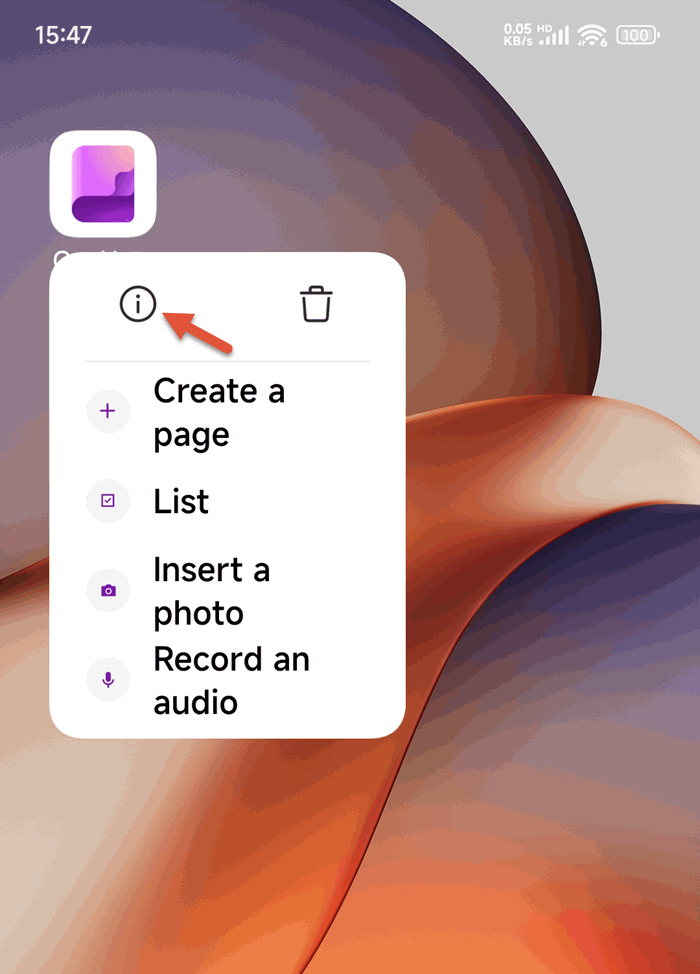
long-press OneNote Android icon on desktop to bring up the right-click menu


2. Next, click to enter the App Info interface, find Storage, and click it.
⚠️ Note that some Android phones will directly display the current storage usage, while others will not. Clicking 'Storage' item to see the current usage)
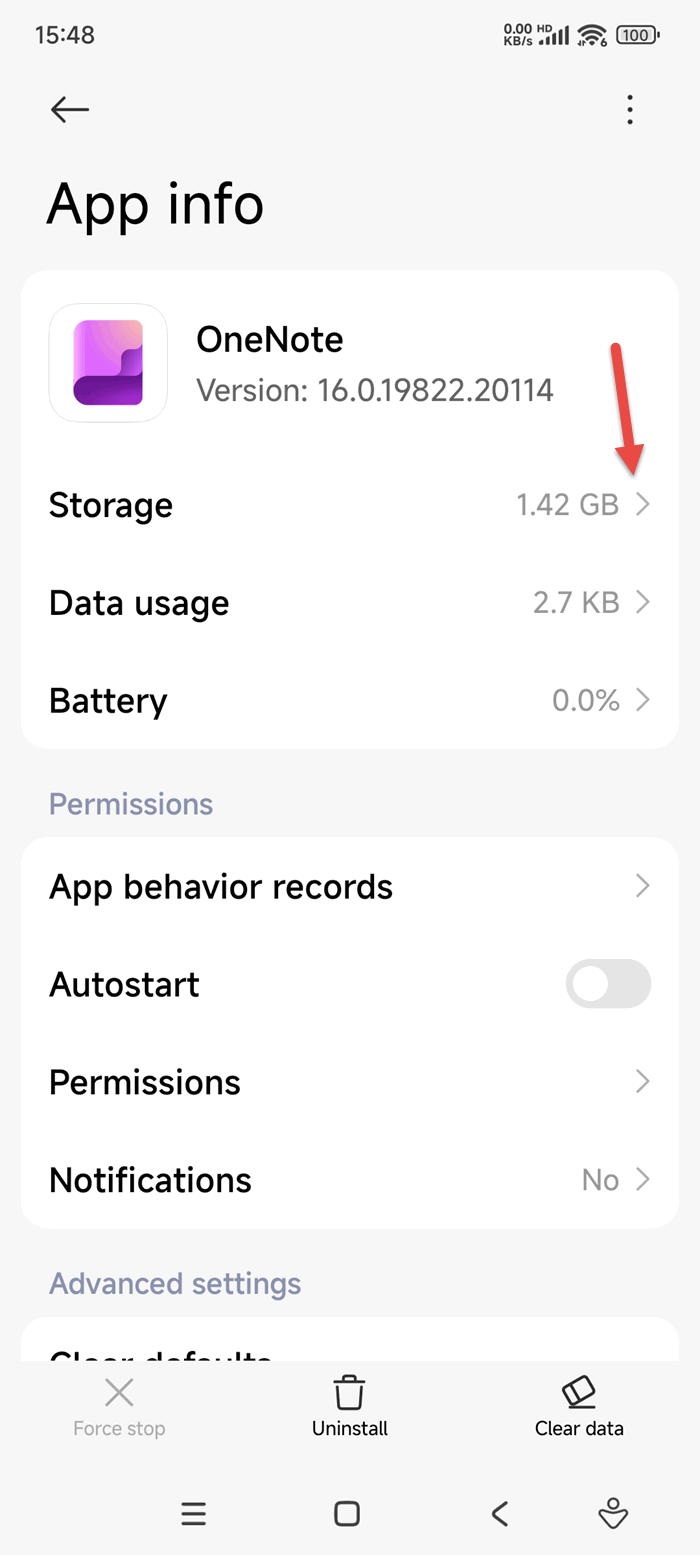
App Info


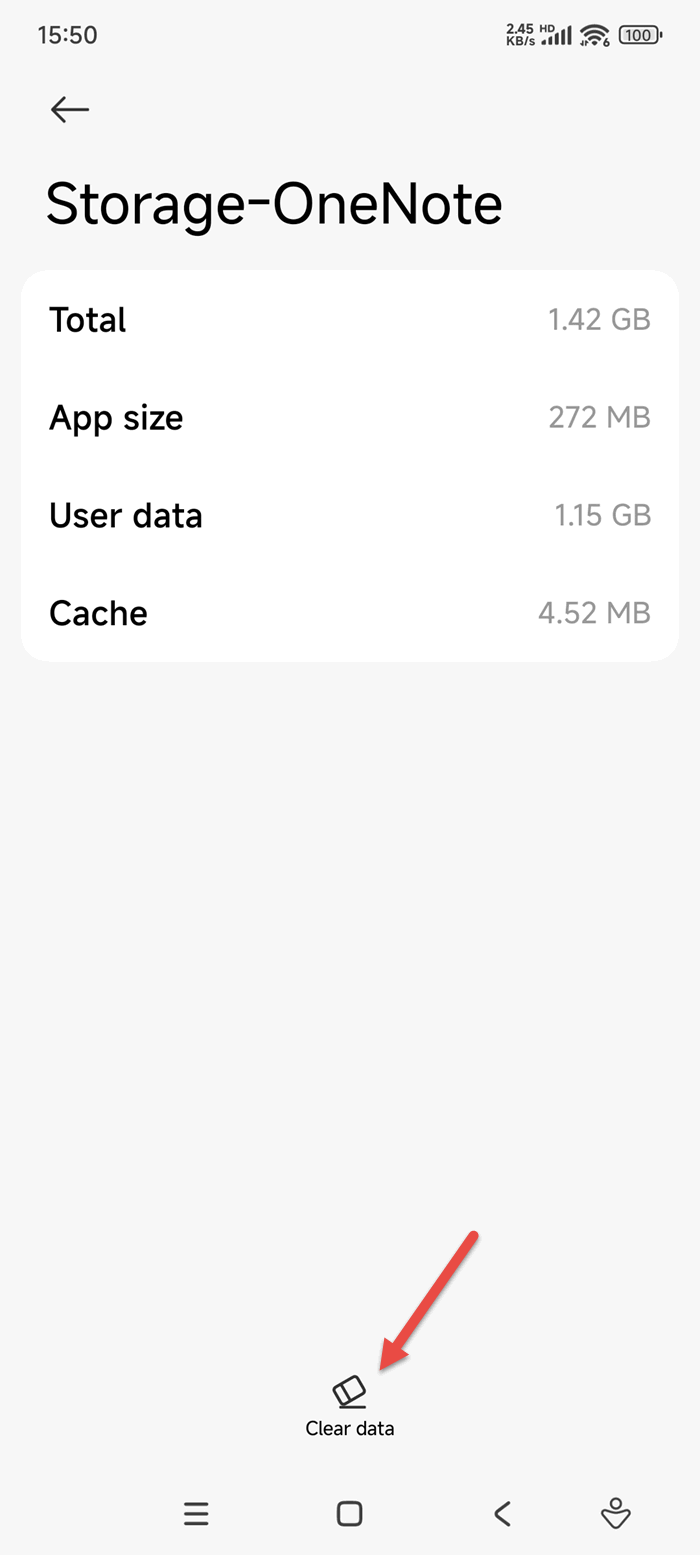
3. After entering the storage usage interface,
You can see data:
  • Total usage.
  • App Size.
  • User data.
  • Cache.
 storage usage interface,


Related Documents

  • How to Clear all Data on Android OneNote?
  • Why does Android OneNote open a Section and see a list of Recent Pages instead of the pages of the section?
  • How to Sort Sections in Android OneNote?
  • 2026.9.1 Android OneNote Sign In Error: Something went wrong [9hehw]
  • Android OneNote: Sticky Notes can't sync your notes because you are signed out
Command Line
Tag System
MindMap Add-Ins Comparison
Search Add-Ins Comparison
One Markdown Syntax
Table Formula
Gantt

Gem Menu Templates
Repair OneNote
OneNote Download
English website Chinese website
Mobile Site
Copyright © 2011-2026 Digital GemSoft. OneNoteGem.com All Rights Reserved.