
Search
OneNoteGem
  • Home
  • Addins
    • Windows Office Addins >
      • Gem for OneNote
      • OneNote Search Bar
      • OneNote Gem - Favorites
      • OneNote Batch
      • Pons for MindManager and OneNote
      • Mind Map for OneNote
      • Pons for Visio and OneNote
      • Row to OneNote
      • Auto OneNote
      • Favorite to OneNote
      • Bridge for EndNote and OneNote
      • Anchor to OneNote
      • Anchor to OneNote for PDF
      • Bring to OneNote
      • Gem Table for OneNote
    • Windows Cloud Addins >
      • CiteBoard for OneNote
      • OneReader
      • OneMind for Web OneNote
      • OneNote Reminder Cloud
      • OneNote Batch Cloud
    • Mac Addins >
      • Gem Menu for Mac OneNote
      • CiteBoard for OneNote
      • Bring to Mac OneNote
      • OneMind for Mac OneNote
      • OneNote Reminder for Mac
      • OneNote Batch for Mac
      • Fix One for Mac - Fix OneNote Login, Sync Tools
    • Android Addins >
      • CiteBoard for OneNote
      • Fix One for Android - Fix OneNote Login, Sync Tools
    • Cross-Platform Addins >
      • OneNote Reminder
      • OneMind for OneNote
      • CiteBoard for OneNote
      • Fix One - Fix OneNote Login, Sync Tools
    • Markdown Addins >
      • Gem for OneNote
      • One Markdown
    • Mind Map Addins >
      • OneNote Gem - Favorites
      • Pons for MindManager and OneNote
      • Mind Map for OneNote
      • Pons for Visio and OneNote
      • OneMind for OneNote
    • Other Addins >
      • Gem Menu for OneNote UWP
      • One Markdown
      • Clip to OneNote
      • WordNote
      • OneShare
      • Fix One for Windows - Fix OneNote Login, Sync Tools
  • Buy
  • Documents
  • FAQs
  • Templates
  • Support
  • Release
  • WordNote
Mind Map for OneNote
 
 
Using OneNote native elements to create Mind Map

OneNote Section Size Larger than 50 MB can Cause 0xE40200B4 Sync Error

2025-12-07 10:05
 

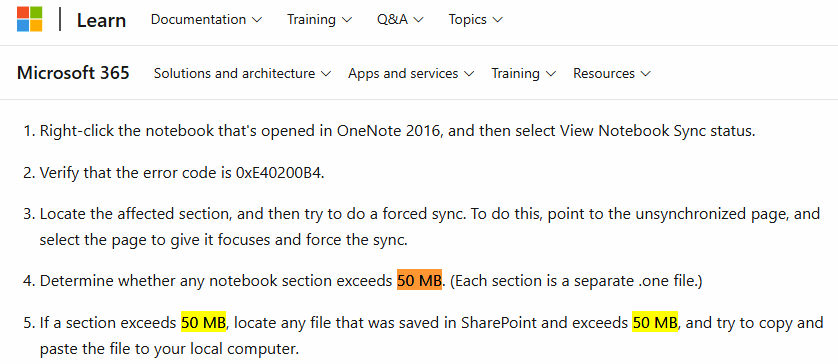
Error Statement on the Microsoft Learn Website:

When a section .one file is larger than 50 MB in size, the OneNote shared notebook sync window reports a 0xE40200B4 sync error.
 

Confirm Error

  1. Opens OneNote's Shared Notebook Synchronization Notebook window.
  2. Check error code: 0xE40200B4
 

Solution

  1. Locate the affected section, and then try to do a forced sync. To do this, point to the unsynchronized page, and select the page to give it focuses and force the sync.
  2. Determine whether any notebook section exceeds 50 MB. (Each section is a separate .one file.)
  3. If the section size is more than 50 MB, you can try splitting the section.
 
OneNote Section Size Larger than 50 MB can Cause 0xE40200B4 Sync Error
 
EXE Addins Cloud Addins MAC Addins

Related Documents

  • How to Create Subsections in OneNote?
  • Microsoft’s Suggestion for OneNote a Single Section or Page won’t Sync
  • How to Sort OneNote Section Groups?
  • Why doesn't OneNote use the newly set font and size?
  • The valid range of OneNote default font, default font size, default font color
Command Line
Tag System
MindMap Add-Ins Comparison
Search Add-Ins Comparison
One Markdown Syntax
Table Formula
Gantt

Gem Menu Templates
Repair OneNote
OneNote Download
English website Chinese website
Mobile Site
Copyright © 2011-2025 Digital GemSoft. OneNoteGem.com All Rights Reserved.