
Search
OneNoteGem
  • Home
  • Addins
    • Windows Office Addins >
      • Gem for OneNote
      • OneNote Search Bar
      • OneNote Gem - Favorites
      • OneNote Batch
      • Pons for MindManager and OneNote
      • Mind Map for OneNote
      • Pons for Visio and OneNote
      • Row to OneNote
      • Auto OneNote
      • Favorite to OneNote
      • Bridge for EndNote and OneNote
      • Anchor to OneNote
      • Anchor to OneNote for PDF
      • Bring to OneNote
      • Gem Table for OneNote
    • Windows Cloud Addins >
      • CiteBoard for OneNote
      • OneReader
      • OneMind for Web OneNote
      • OneNote Reminder Cloud
      • OneNote Batch Cloud
    • Mac Addins >
      • Gem Menu for Mac OneNote
      • CiteBoard for OneNote
      • Bring to Mac OneNote
      • OneMind for Mac OneNote
      • OneNote Reminder for Mac
      • OneNote Batch for Mac
      • Fix One for Mac - Fix OneNote Login, Sync Tools
    • Android Addins >
      • CiteBoard for OneNote
      • Fix One for Android - Fix OneNote Login, Sync Tools
    • Cross-Platform Addins >
      • OneNote Reminder
      • OneMind for OneNote
      • CiteBoard for OneNote
      • Fix One - Fix OneNote Login, Sync Tools
    • Markdown Addins >
      • Gem for OneNote
      • One Markdown
    • Mind Map Addins >
      • OneNote Gem - Favorites
      • Pons for MindManager and OneNote
      • Mind Map for OneNote
      • Pons for Visio and OneNote
      • OneMind for OneNote
    • Other Addins >
      • Gem Menu for OneNote UWP
      • One Markdown
      • Clip to OneNote
      • WordNote
      • OneShare
      • Fix One for Windows - Fix OneNote Login, Sync Tools
  • Buy
  • Documents
  • FAQs
  • Templates
  • Support
  • Release
  • WordNote
Mind Map for OneNote
 
 
Using OneNote native elements to create Mind Map

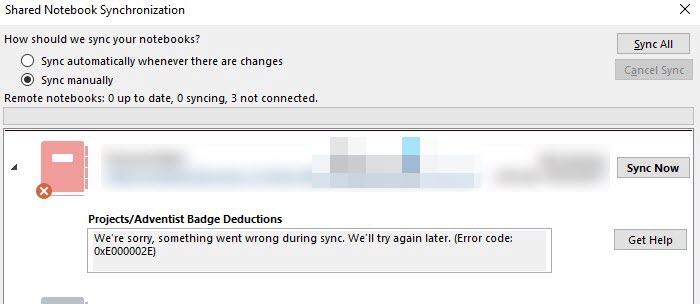
OneNote: something went wrong during sync. We’ll try again later. (Error code: 0xE000002E)

2025-12-14 08:08
 

Question

I use OneNote for Desktop with 2 computers. I made changes within one of my notebooks on computer ("PC1"), but never saw the notes on the other computer ("PC2")
 
PC1 shows the following error message within the Shared Notebook Synchronization screen for a notebook:
 
[Section Name] OneNote can't sync your notes right now. We'll keep trying (Error code: 0xE000002E bjief)
 
It's been trying for 3 days now.
 
Other details that might be helpful in resolving this:
 
  • This is part of an Office 365 installation with monthly subscription
  • This notebook and all notebooks are saved to a SharePoint location with URL of [businessname]-my.sharepoint.com/personal/[username]/Documents/Notebooks/
  • Directly accessing the notebook via the above URL does not show the changes on PC1
  • Changes on PC2 to notes within the notebook and section name called out in the error show up on PC1, but not vice-versa
 
What should I do to get my notes to sync and to make sure the error doesn't happen again?
OneNote: something went wrong during sync. We’ll try again later. (Error code: 0xE000002E)

Answer

Move all the pages from the non-syncing section into another section. then deleted the non-syncing section on PC1 and PC2.
Now on PC1 the 0xE000002E bjief error only shows for OneNote_RecycleBin/[Section Name].
 
Finally, empty the recycle bin: History -> History -> Notebook Recycle Bin -> Empty Recycle Bin
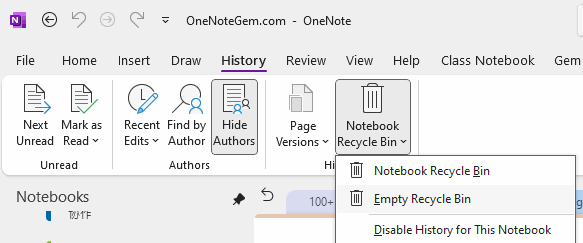
 
Empty Recycle Bin


EXE Addins Cloud Addins MAC Addins

Related Documents

  • OneNote: This section isn’t available yet. It was added from another device. Able to use it when that device syncs.
  • OneNote: You no longer have permission to access this notebook. We’ll sync again if permissions are restored
  • Event: 2024.12.11, OneNote failed to sync some sections for the 3th time. [Unresolved]
  • OneNote can't sync your notes because your account is out of space
  • Event:2024.10 some OneNote sections disappear, reopen the notebook not synchronize these disappeared sections
Command Line
Tag System
MindMap Add-Ins Comparison
Search Add-Ins Comparison
One Markdown Syntax
Table Formula
Gantt

Gem Menu Templates
Repair OneNote
OneNote Download
English website Chinese website
Mobile Site
Copyright © 2011-2025 Digital GemSoft. OneNoteGem.com All Rights Reserved.