Search
OneNoteGem
  • Home
  • Addins
    • Windows Office Addins >
      • Gem for OneNote
      • OneNote Search Bar
      • OneNote Gem - Favorites
      • OneNote Batch
      • Pons for MindManager and OneNote
      • Mind Map for OneNote
      • Pons for Visio and OneNote
      • Row to OneNote
      • Auto OneNote
      • Favorite to OneNote
      • Bridge for EndNote and OneNote
      • Anchor to OneNote
      • Anchor to OneNote for PDF
      • Bring to OneNote
      • Gem Table for OneNote
    • Windows Cloud Addins >
      • CiteBoard for OneNote
      • OneReader
      • OneMind for Web OneNote
      • OneNote Reminder Cloud
      • OneNote Batch Cloud
    • Mac Addins >
      • Gem Menu for Mac OneNote
      • CiteBoard for OneNote
      • Bring to Mac OneNote
      • OneMind for Mac OneNote
      • OneNote Reminder for Mac
      • OneNote Batch for Mac
      • Fix One for Mac - Fix OneNote Login, Sync Tools
    • Android Addins >
      • CiteBoard for OneNote
      • Fix One for Android - Fix OneNote Login, Sync Tools
    • Cross-Platform Addins >
      • OneNote Reminder
      • OneMind for OneNote
      • CiteBoard for OneNote
      • Fix One - Fix OneNote Login, Sync Tools
    • Markdown Addins >
      • Gem for OneNote
      • One Markdown
    • Mind Map Addins >
      • OneNote Gem - Favorites
      • Pons for MindManager and OneNote
      • Mind Map for OneNote
      • Pons for Visio and OneNote
      • OneMind for OneNote
    • Other Addins >
      • Gem Menu for OneNote UWP
      • One Markdown
      • Clip to OneNote
      • WordNote
      • OneShare
      • Fix One for Windows - Fix OneNote Login, Sync Tools
      • OneNote for Windows 10 Reviver - UWP Reviver
  • Buy
  • Documents
  • FAQs
  • Templates
  • Support
  • Release
  • WordNote
Mind Map for OneNote
 
 
Using OneNote native elements to create Mind Map

OneNote: It looks like you don't have permission to edit this notebook. Contact the notebook owner to request access

2026-11-05 07:57
 

Question:

My Mac OneNote have recently been unable to be edited. A banner keeps displaying in the window:
 
It looks like you don't have permission to edit this notebook. Contact the notebook owner to request access, and we'll try syncing again.
 
What if should this problem be solved?

It looks like you don't have permission to edit this notebook. Contact the notebook owner to request access, and we'll try syncing again.


Inspection:

 
You can use the "Notebook Information" menu item in OneNote Batch for Mac to check whether the OneNote shared notebook was created by you.
 

Open Notebook Information

  1. Download and Install OneNote Batch for Mac
  2. Sign-in your Microsoft account in OneNote Batch
  3. Then, in the left side of OneNote Batch's notebook tree, click the notebook icon to select the notebook (the icon with the people indicates a notebook shared by multiple users).
  4. Then, right-click, and the right-click menu will pop up. Click the "Notebook Information" menu item.
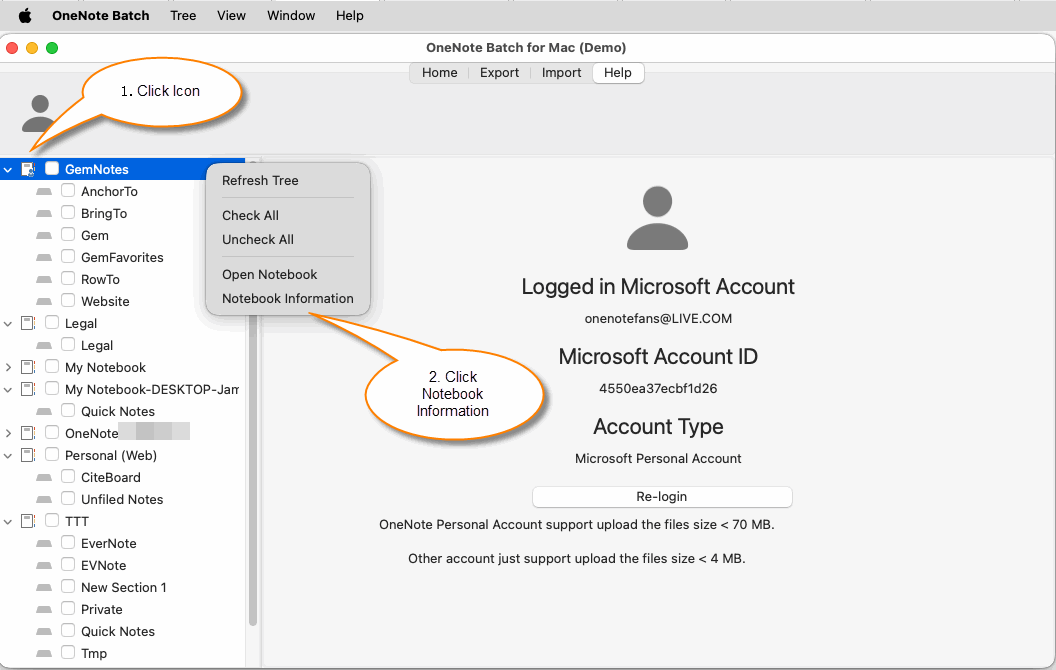
"Notebook Information" menu item


Compare Information between Your Account and the Notebook Creator Account

 
You can compare the account information in the "Notebook Information" window with the account you are currently logged into OneNote Batch:


OneNote Batch

Notebook

Account

onenotefans@live.com

James linton

Account ID

4550ea37ecbfd26

5ebc697cecfdaf4b


Obviously, the GemNotes notebook was not created by your Microsoft account.
This notebook was created by other account and then shared with you for use.
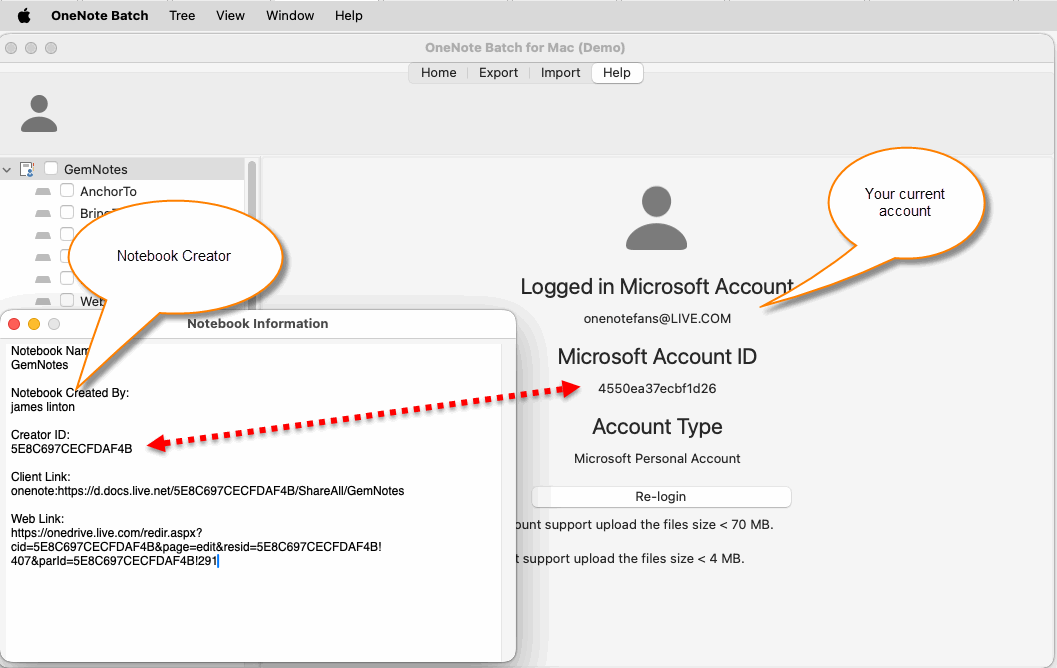
Compare Information between Your Account and the Notebook Creator Account

Solution:

Case 1:

If the OneNote notebook was not created by your account, you need to contact that user and grant editing permissions to continue editing the notebook.
 

Case 2:

If it's a notebook created by your account. There is a situation where your account may have been unused for a long time and has been frozen by Microsoft. You need to access onedrive.com in browser to unfreeze your account.


Download OneNote Batch for Mac

Related Documents

  • How to transfer a OneNote notebook from Microsoft Work Account to Personal Account in Mac?
  • How to import local .one files into a notebook of Mac OneNote as sections?
  • How to Copy Multiple Sections and Section Groups to the Specified Notebook or Section Group at Once for Mac OneNote?
  • View Mac OneNote notebooks, section groups, sections sizes to prevent exceeding the 2GB size limit in OneDrive.com
  • Mac: Export the Notebook Structure from OneNote in Bulk and Export the Pages as an HTML Files
Command Line
Tag System
MindMap Add-Ins Comparison
Search Add-Ins Comparison
One Markdown Syntax
Table Formula
Gantt

Gem Menu Templates
Repair OneNote
OneNote Download
English website Chinese website
Mobile Site
Copyright © 2011-2026 Digital GemSoft. OneNoteGem.com All Rights Reserved.