
Search
OneNoteGem
  • Home
  • Addins
    • Windows Office Addins >
      • Gem for OneNote
      • OneNote Search Bar
      • OneNote Gem - Favorites
      • OneNote Batch
      • Pons for MindManager and OneNote
      • Mind Map for OneNote
      • Pons for Visio and OneNote
      • Row to OneNote
      • Auto OneNote
      • Favorite to OneNote
      • Bridge for EndNote and OneNote
      • Anchor to OneNote
      • Anchor to OneNote for PDF
      • Bring to OneNote
      • Gem Table for OneNote
    • Windows Cloud Addins >
      • CiteBoard for OneNote
      • OneReader
      • OneMind for Web OneNote
      • OneNote Reminder Cloud
      • OneNote Batch Cloud
    • Mac Addins >
      • Gem Menu for Mac OneNote
      • CiteBoard for OneNote
      • Bring to Mac OneNote
      • OneMind for Mac OneNote
      • OneNote Reminder for Mac
      • OneNote Batch for Mac
      • Fix One for Mac - Fix OneNote Login, Sync Tools
    • Android Addins >
      • CiteBoard for OneNote
      • Fix One for Android - Fix OneNote Login, Sync Tools
    • Cross-Platform Addins >
      • OneNote Reminder
      • OneMind for OneNote
      • CiteBoard for OneNote
      • Fix One - Fix OneNote Login, Sync Tools
    • Markdown Addins >
      • Gem for OneNote
      • One Markdown
    • Mind Map Addins >
      • OneNote Gem - Favorites
      • Pons for MindManager and OneNote
      • Mind Map for OneNote
      • Pons for Visio and OneNote
      • OneMind for OneNote
    • Other Addins >
      • Gem Menu for OneNote UWP
      • One Markdown
      • Clip to OneNote
      • WordNote
      • OneShare
      • Fix One for Windows - Fix OneNote Login, Sync Tools
      • OneNote for Windows 10 Reviver - UWP Reviver
  • Buy
  • Documents
  • FAQs
  • Templates
  • Support
  • Release
  • WordNote
Mind Map for OneNote
 
 
Using OneNote native elements to create Mind Map

How to Import the section .one files tree into the specified Notebook in Office OneNote?

2026-06-09 07:33
 

Section Structure Tree for Old Notebook

There is an old OneNote notebook, which contains 3 folders:
  • OneNote 2007 Guide
  • Personal Notebook
  • Work Notebook
 
These folders contain many .one files, and now I want to import them into Office OneNote's My Notebook using the original tree structure.
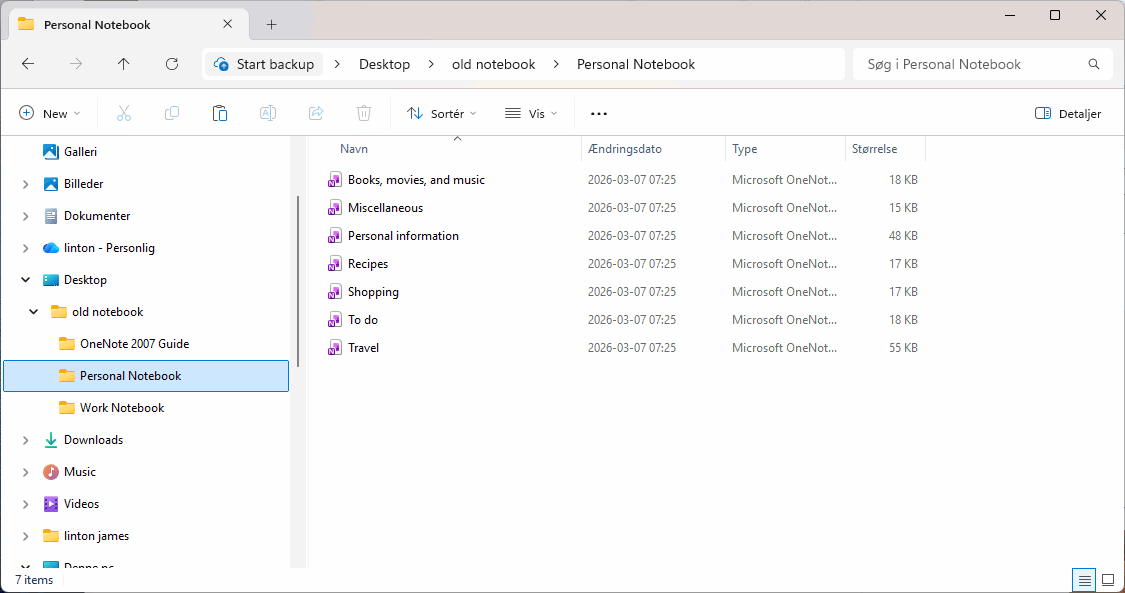

Section Structure Tree for Old Notebook

Office OneNote’s My Notebook

In Office OneNote, we have opened My Notebook, which has only one section called New Section 1.
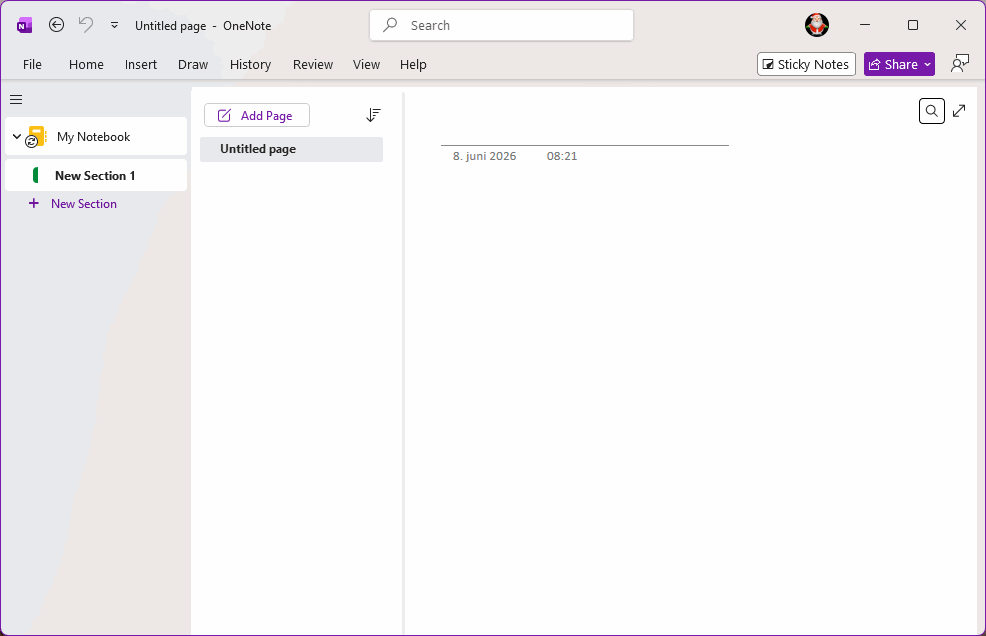

Office OneNote’s My Notebook

Open the Folder and Import It

In OneNote Batch:
  1. Click “Import” tab
  2. Click “Import Section Folder” feature
  3. In the notebook tree on the left, check the notebook you want to import: My Notebook
  4. On the right side, click the Folder button to open the old notebook folder. Once opened, you can see:
    1. After importing subfolders under Old Notebook, they will become section group
      1. OneNote 2007 Guide
      2. Personal Notebook
      3. Work Notebook
    2. .one files under Old Notebook will become sections
  5. Finally, click the "Start" button on the right to begin batch importing:
    1. If the import is successful, the Status column will display Success
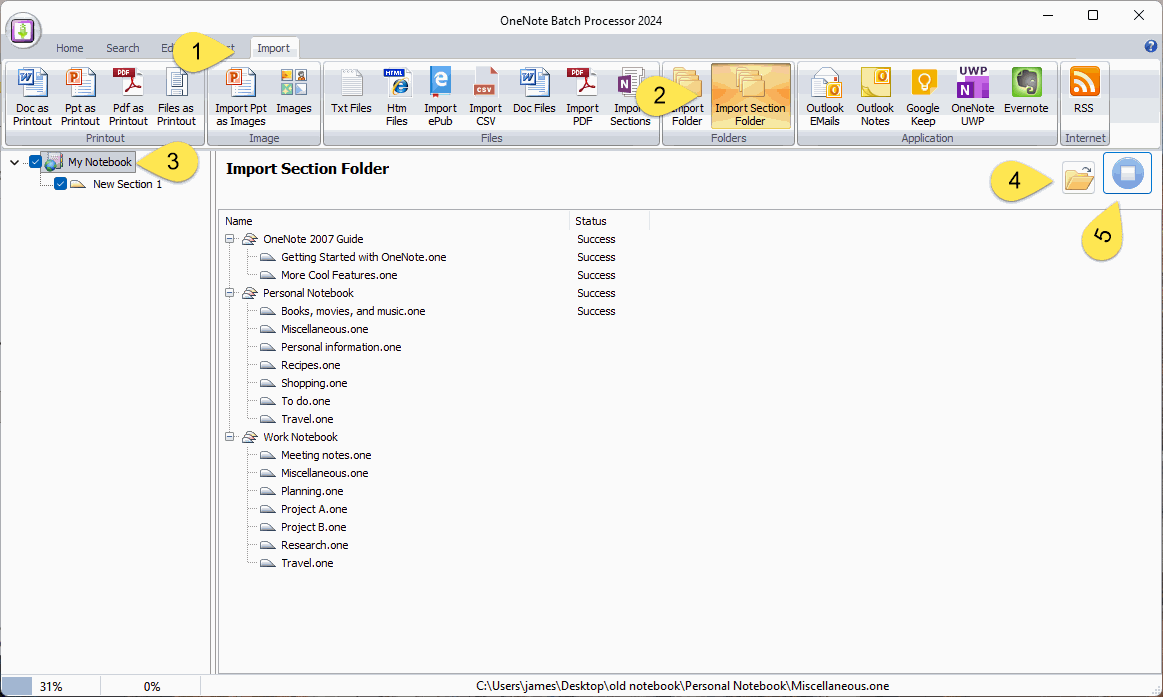
 
Import subfolders and .one files by OneNote Batch


View successfully Imported Section Groups and Sections

Once the OneNote Batch is successfully imported, return to Office OneNote to see the generated section groups, sections and pages.
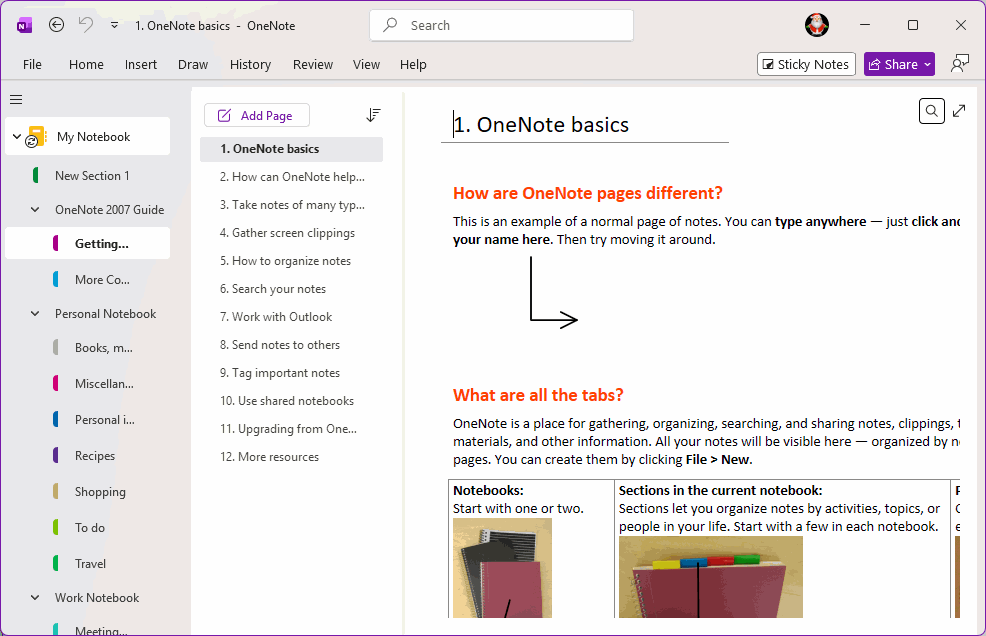

View successfully Imported Section Groups and Sections


Download OneNote Batch

Related Documents

  • How to Import Section .one files into designated notebook or section group in Office OneNote in bulk?
  • Successful transfer of OneNote for Windows 10 notes: Import notes that not synced for a long time into Office OneNote
  • How to import unsynced notes from OneNote for Windows 10 into Office OneNote?
  • How to Import Samsung Notes into OneNote?
  • Export Evernote notes to HTML File and Import Them into Office OneNote
Command Line
Tag System
MindMap Add-Ins Comparison
Search Add-Ins Comparison
One Markdown Syntax
Table Formula
Gantt

Gem Menu Templates
Repair OneNote
OneNote Download
English website Chinese website
Mobile Site
Copyright © 2011-2026 Digital GemSoft. OneNoteGem.com All Rights Reserved.