
How to Set OneNote (Desktop) as the Default Printer for Windows?
2026-08-09 06:38
The default Windows printer can be set in Windows Settings.
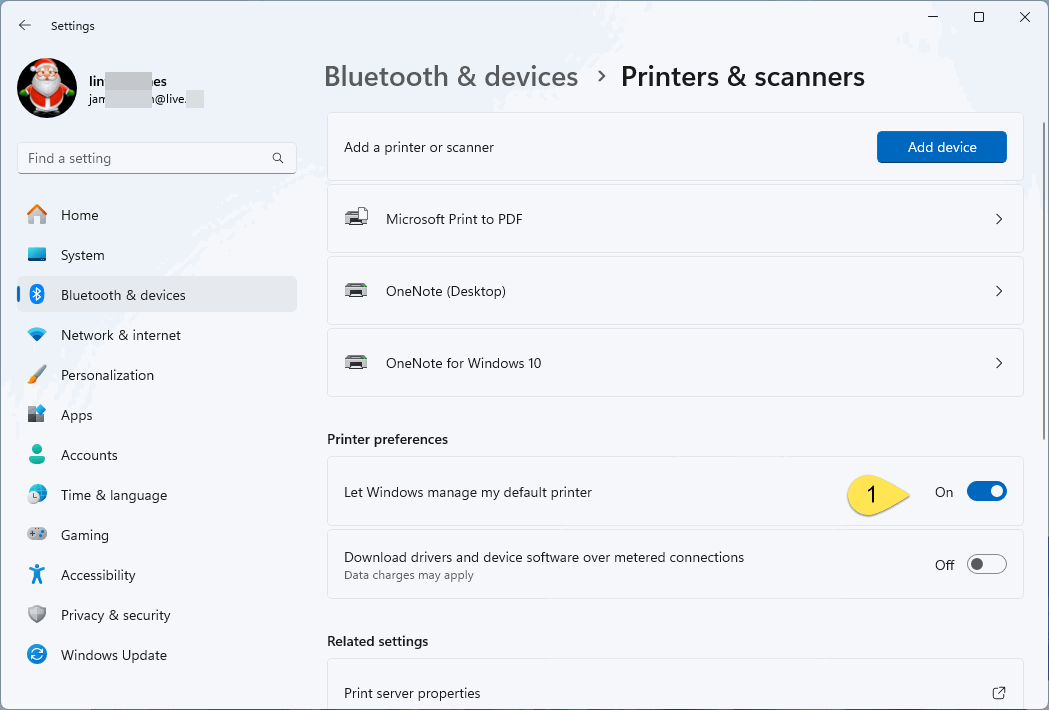
1. Disable "Let Windows manage my default printer"
When go to Windows Settings -> Bluetooth & devices -> Printer & scanners, we found that it didn't show which printer is the default printer.
This is because the option "Let Windows manage default printer" is enabled.
So you need to turn off "Let Windows manage default printer" at first.
2. Click "OneNote (Desktop)" Virtual Printer
| EXE Addins | Cloud Addins | MAC Addins |
Related Documents
- Does OneNote can show the section in navigation pane where the page after searching and clicking?
- Office OneNote v2606, v2607 freezes when switching to normal pen drawing, and the drawn shapes will appear after respond
- OneNote v2604 Changed the Copy function Ctrl+C from Image format to Plain Text Format
- How to setup the Quick Notes section of OneNote?
- How to fix the OneNote notebook pane fills the entire window and flickering when Collapse Sidebar?

